
An informative guide to Rate Check in the Yanolja Cloud Solution Booking Engine — what it shows guests, how channel rates are represented, and how the comparison works.
What is Rate Check?
Rate Check is a price comparison feature in the Yanolja Cloud Solution Booking Engine. It helps guests see how your direct rate stacks up against indicative rates from your connected distribution channels — without leaving the booking page.
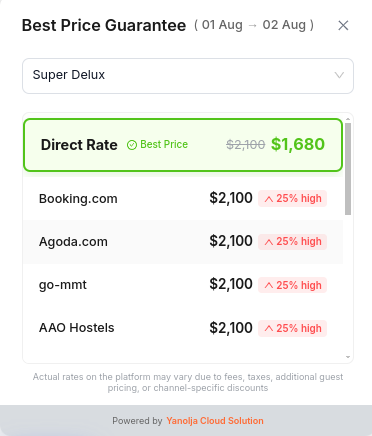
Guests open it as a Best Price Guarantee panel for their selected dates and room. They can switch room types and compare each option in one place.
How to enable Rate Check
Rate Check is not available on the Booking Engine alone. It depends on channel connectivity through Yanolja Cloud Solution.
-
Purchase YCS Channel Manager Rate Check requires an active YCS Channel Manager subscription.
-
Connect your distribution channels Use YCS Channel Manager to connect your online travel agencies / distribution channels.
-
Rate Check becomes available Once channels are connected and rates are available for the guest’s search, Rate Check can appear in the Yanolja Cloud Solution Booking Engine.
How it works
Which rates are shown
Rate Check displays two types of rates side by side for the selected room and stay dates:
Your best direct stay price
- Best (lowest) direct price for that room type in the Yanolja Cloud Solution Booking Engine
- Matches the guest’s selected dates
- May include direct booking discount / specials
- Highlighted as Best Price when it leads
Indicative channel totals
- From your channel rate allocation in YCS Channel Manager
- Same stay dates + searched occupancy
- Base rate + extra adult/child used for that occupancy
- Shows “% high” when above Direct
Not included in the comparison
- Taxes
- Fees
- Channel-only promotions
- Loyalty member discounts
- Flash deals funded by the channel
- Personalization by device / login
Rate Check provides a clear, rate-based comparison from your YCS Channel Manager pricing setup, so guests can see how your Direct Rate compares with your connected channel rates.
How Rate Check relates to online travel agency websites
Channel website prices can vary for the same room and night.
Factors that can influence what appears on a third-party booking site include:
- Fees & tax display
- Occupancy pricing
- Channel promotions
- Loyalty / login status
- Device or location
- Channel-funded discounts
Rate Check is designed to give guests a transparent, rate-based view of how your Direct Rate compares with your connected channel rates in YCS Channel Manager — helping reinforce the value of booking direct.
What Rate Check depends on
To review which channels appear, open YCS Channel Manager and confirm the channel is active with rates loaded for the selected dates and room type.
Disclaimer guests see
In the Rate Check panel:
“Actual rates on the platform may vary due to fees, taxes, additional guest pricing, or channel-specific discounts”
This keeps expectations clear: Rate Check is an indicative comparison, not a live mirror of every third-party website price.
Supporting direct bookings
Benefits for your property
Roadmap: what’s next
Today: clear comparison at booking time. Coming next:
Frequently asked questions
How does Rate Check relate to prices on online travel agency websites?
Rate Check uses your channel rates from YCS Channel Manager as an indicative comparison. Third-party booking pages may show different figures based on taxes, fees, promotions, loyalty, and personalization.
Which rate is shown as Direct Rate?
The best available direct booking stay price for the selected room type and dates in the Yanolja Cloud Solution Booking Engine, including applicable direct discounts or specials.
Which channel rates are shown?
Indicative stay totals from your channels connected in YCS Channel Manager for the same dates and occupancy (base plus relevant extra adult/child pricing). Taxes, fees, and channel-only promotions are not included.
What should I check if a channel does not appear?
Confirm you have an active YCS Channel Manager subscription, the channel is connected, and rates are loaded for the selected dates and room type.
When does Rate Check appear?
Rate Check appears when YCS Channel Manager has connected channels with comparable rates — and your Direct Rate is equal to or better than at least one connected channel rate for that room. If no comparable channel rates are available for the search, Rate Check may not display.